
Updating ChannelWatch
ChannelWatch v1.6.5 installs from Settings > Updates on v1.4.0, v1.4.1, v1.4.5, v1.5.3, v1.6.0, v1.6.1, v1.6.2, v1.6.3, and v1.6.4 without recreating the container.
Install the update in the app
Section titled “Install the update in the app”- Back up
/config, including/config/encryption.key. - Open Settings > Updates and choose Check for updates.
- Review the offered version and apply the update. Leave the update page open while the app restarts.
- After reconnecting, confirm the app reports the version you selected and your DVRs, settings, and history are present.
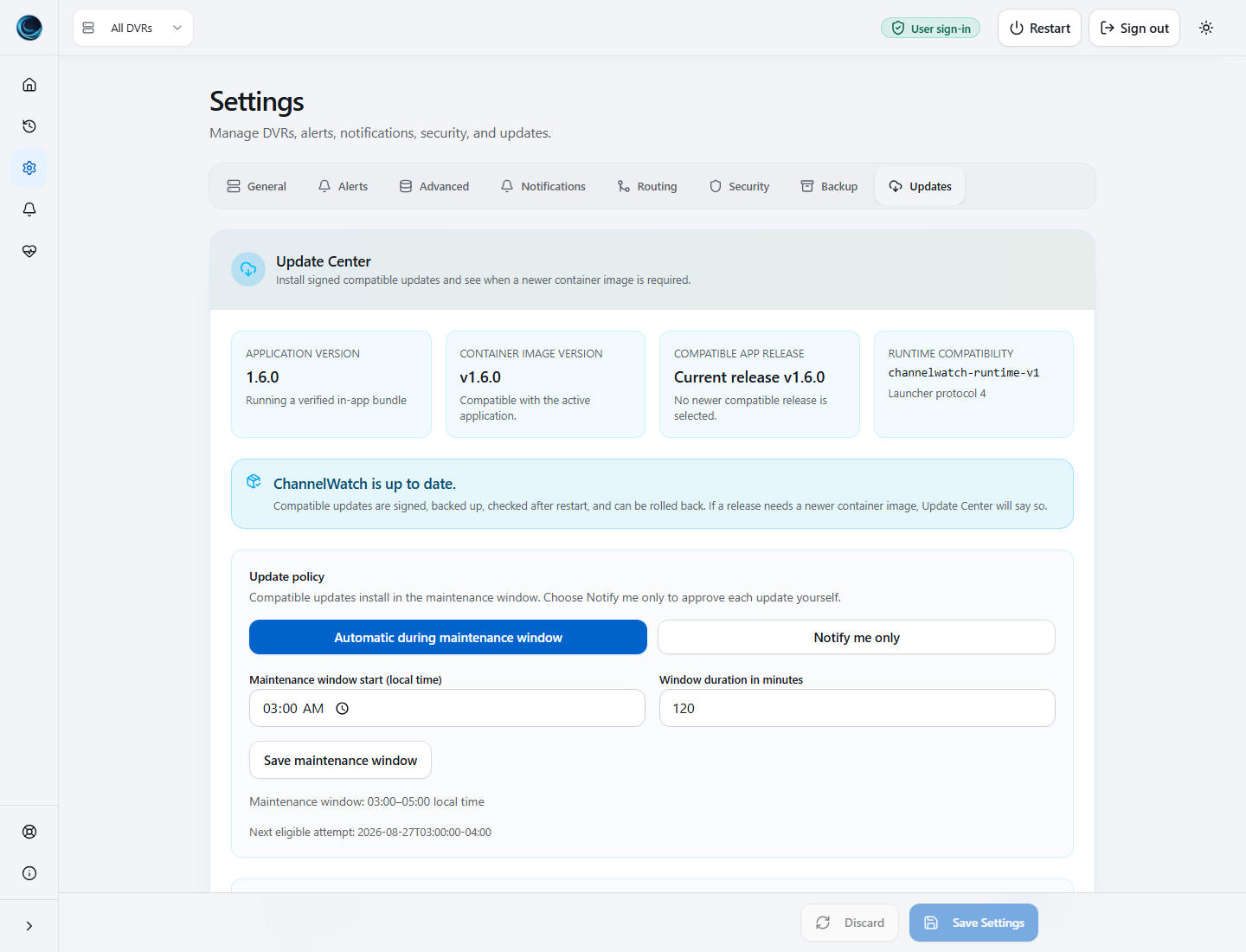
No intermediate release or container recreation is needed from v1.4.0, v1.4.1, v1.4.5, or v1.5.3. Automatic installation is disabled for this release; apply it manually.
The v1.4.x compatibility bridge updates the application while retaining the Python packages and system libraries in the existing image. It does not turn that image into a protocol 4 image. The v1.5.3 path installs the application and official Python packages together as a signed runtime generation.
If you run an older version, or Update Center reports that an image update is required, use your deployment’s normal image-update process and keep the existing /config mount. See Docker Compose, Unraid, TrueNAS, or Portainer. For Helm, update image.tag in your existing values and preserve the PersistentVolumeClaim mounted at /config.
What protocol 4 enables
Section titled “What protocol 4 enables”On a v1.5.3 image, v1.6.0 packages the ChannelWatch app and its official Python packages as one signed runtime generation. Release qualification covers compatibility, restart, and rollback on AMD64 and ARM64. Update Center then selects the matching generation for the installed architecture, prepares it under /config, verifies it through the image-owned launcher, and restarts the ChannelWatch app processes inside the same container.
The application, frontend, and Python packages activate together. Core and UI must both report healthy for that exact generation. If activation fails, ChannelWatch restores the previous generation or the app copy in the image. Retry and Roll back remain available when the recorded job state permits them.
For v1.6.0, install manually from Settings > Updates. Your saved automatic or notify-only preference is preserved. For later releases, automatic installation runs only when the signed metadata permits it and the release is compatible with your installed image and selected policy.
Preparation and restart timing
Section titled “Preparation and restart timing”Preparing a signed runtime generation can take up to 10 minutes. ChannelWatch downloads and verifies the release, expands it into an inactive directory, and prepares the matching package environment before changing the active selection.
Activation then has a separate two-minute launcher validation deadline. The browser follows the same job for up to three minutes while Core and UI restart and validate. A brief disconnect during that time is expected. Leave the update job open and do not submit Apply again. If the job records a failure, correct the reported cause and use Retry.
Preparation requires writable, executable persistent storage. If /config is mounted with noexec, ChannelWatch stops before activation and leaves the previous runtime selected. Remount /config without noexec before retrying; installing packages into the image with pip or apt is not a supported workaround.
What still requires an image update
Section titled “What still requires an image update”Protocol 4 does not replace every future container update. Use Docker, Unraid, Compose, or Helm when a release changes:
- the Python interpreter;
- the base image, operating system, or glibc;
- Supervisor or container startup behavior;
- the image-owned launcher or verifier;
- runtime ABI, persistent schema, or deployment assumptions that are incompatible with the installed image.
Official relocatable Python builds are not currently available for both supported architectures, so interpreter replacement remains deferred to container images. ChannelWatch does not control the host Docker socket, run an external Docker controller, patch the image with apt or pip, or switch to an unverified fork to work around this boundary.
Using a protocol 4 image does not promise that every later release will be in-app. Update Center offers a generation only when the signed catalog includes complete compatible application and official package variants for the current architecture. Otherwise it shows container image update required.
Checking which runtime is active
Section titled “Checking which runtime is active”For troubleshooting, channelwatch doctor runtime-info reports the app and Python built into the container image. The authenticated Update Center status API exposes worker_runtime for the responding app process and its verified generation. The command-line report can therefore show the image version after a successful in-app update.
Rollback and recovery
Section titled “Rollback and recovery”Rollback changes the active application and package generation, then restarts the ChannelWatch app processes. It does not restore old settings or database contents. Use Settings > Backup or your normal /config backup when you need to restore data. See Backup & Restore before restoring a backup.
The protocol 4 work strengthens verification and coordinates app-process restarts, but it does not establish the original cause of the restart report tracked in GitHub issue #22. That investigation remains open.
Auth-disabled installs
Section titled “Auth-disabled installs”If CW_DISABLE_AUTH=true, anyone who can reach the UI can run admin operations, including updates and rollback. Keep auth-disabled installs on a trusted private network only.
Where update files live
Section titled “Where update files live”Update runtime files live under /config/channelwatch-runtime/:
| Path | Purpose |
|---|---|
active.json |
Active runtime generation pointer. |
latest.json |
Last trusted update manifest. |
rollback.json |
Previous runtime pointer and backup path. |
update-job.json |
Last update/check/rollback operation state. |
update.lock |
Single-flight update lock. |
releases/<generation-sha256>/ |
Verified application and package generation. |
trust/<generation-sha256>.json |
Signed catalog retained for launcher verification. |
Downloaded runtime generations are not included in normal app backup zips. Keep a separate /config backup routine for disaster recovery.