
DVR Health Alerts
DVR Health alerts tell you when ChannelWatch loses contact with a DVR and when that connection recovers. They use the existing monitor and watchdog state, so a quiet DVR does not need to produce viewing activity to stay healthy.
Configure outage alerts
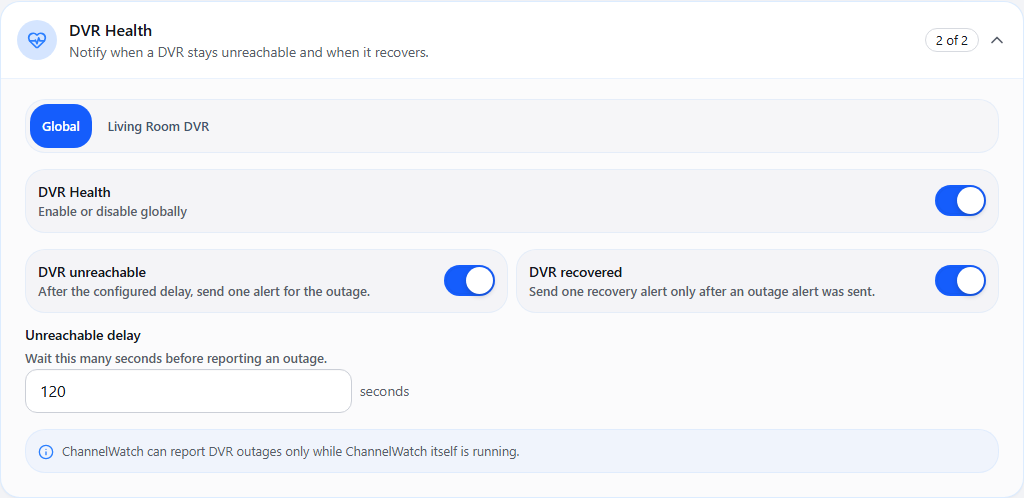
Section titled “Configure outage alerts”- Open Settings > Alerts > DVR Health.
- Choose Global or a specific DVR.
- Enable DVR Health, then choose the unreachable and recovery notifications you want.
- Set the outage delay. The default is 120 seconds; the UI accepts 30–3,600 seconds.
- Select Save, then allow the destination under Settings > Routing > DVR Health.
Fresh v1.6.0 installs enable these alerts through Important Only. Existing installs keep their saved choices.
When a notification fires
Section titled “When a notification fires”| Connection state | Behavior |
|---|---|
| Brief loss shorter than the delay | No outage notification |
| Still unavailable after the delay | One unreachable notification for that outage, when enabled |
| Still unavailable afterward | No repeated outage message on every monitor check |
| Healthy again after a notified outage | One recovery notification, when enabled |
| Already unavailable when ChannelWatch starts | Wait for both the outage delay and the five-minute startup grace period |
The outage state is saved per DVR so restarting ChannelWatch does not turn one ongoing outage into a stream of duplicate alerts.
Recovery delivery is paired with an outage notification accepted by ChannelWatch’s delivery queue. It does not prove that a phone displayed the outage message; check the delivery log and receiving app for that.
Message examples
Section titled “Message examples”These examples use a synthetic DVR name:
Title: DVR is unreachableChannelWatch cannot currently reach Living Room DVR.Title: DVR connection recoveredChannelWatch is connected to Living Room DVR again.DVR Health uses built-in wording. It has no separate custom template editor in v1.6.0.
What the alert means
Section titled “What the alert means”An unreachable alert means ChannelWatch cannot currently monitor that DVR. It can result from the DVR stopping, a network problem, an unreachable address, or a stale monitor connection. It is not proof that the DVR’s recordings or disks have failed.
Check Per-DVR Health and Diagnostics to find the affected server and connection state before restarting services.
Missing an expected alert
Section titled “Missing an expected alert”- Check the effective DVR scope, DVR Health switch, and individual outcome switches.
- Confirm the outage lasted beyond the delay and, for a startup outage, the five-minute grace period.
- Verify the health route allows a configured destination.
- Review the Delivery Log for failed or skipped attempts.
- If recovery is missing, check that the corresponding outage notification entered delivery and Recovered is enabled.
Related pages
Section titled “Related pages”- Alert Presets for quieter notification policies
- Per-DVR Notification Routing for destination choices
- Per-DVR Health for status and freshness details